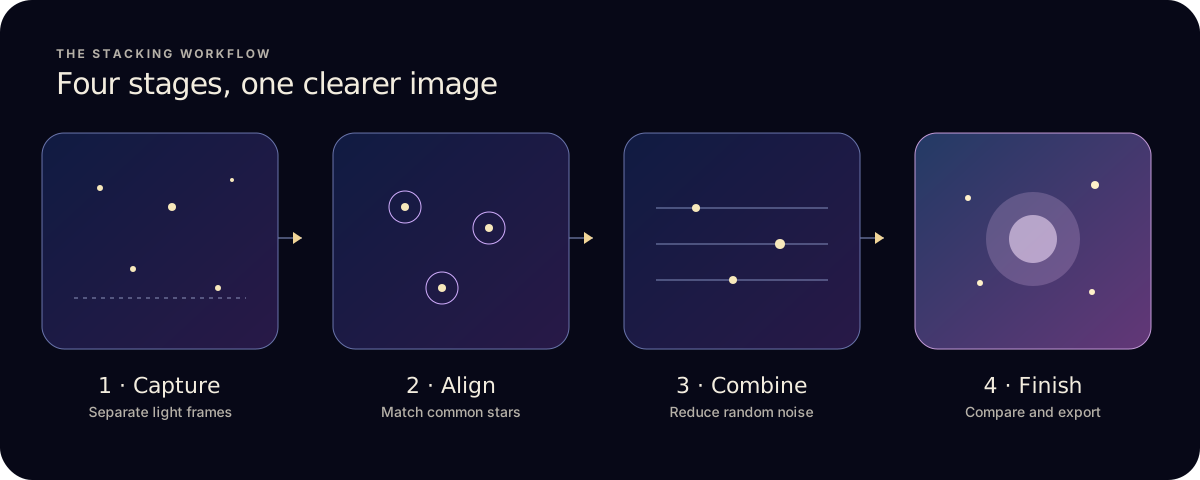
- Capture several separate exposures of the same target.
- Optionally add calibration frames: darks, flats, bias or dark-flats.
- The stacker registers the frames so the same stars sit on the same pixels.
- It combines each pixel across frames with a stacking method, then you stretch and finish the result.
1. Why several frames beat one
Every exposure contains two things: signal, the light that really arrived from the sky, and noise, the random grain added by the sensor and by the light itself. Signal is the same from one frame to the next. Noise is different every time.
When you average matching frames, the repeated signal holds steady while the random parts partly cancel out. Noise falls roughly with the square root of the number of frames, so four frames give about half the noise of one, and sixteen give about a quarter. That is why stacking helps most on faint targets and why each extra frame adds a little less than the one before.
2. Alignment: putting the stars back in the same place
Between exposures the sky turns, the mount drifts or the phone moves slightly. Before frames can be combined, the stacker has to register them: find the same stars in each frame and shift or rotate the images so those stars line up.
- Detect stars in every frame.
- Match patterns of stars between each frame and a reference frame.
- Transform each frame so its stars land on the reference positions. Sub-pixel alignment keeps stars round instead of slightly smeared.
- Score quality. Frames with blur, cloud or too few matched stars can be flagged or left out.
Alignment follows the stars, so anything that doesn’t move with the sky, like a tree line or building, will shift between frames. That is why wide-field shots with a landscape foreground often need the sky and ground handled separately.
3. Stacking methods: how each pixel is combined
This is the step most people mean when they talk about an astro image stacker. Once the frames line up, the stacker looks at the same pixel in every frame and decides what value to keep. The method changes how it treats outliers such as satellite trails, aircraft lights or a frame that caught a gust of wind. These are the methods you’ll meet in most stackers:
- Average
- The mean of every frame. The cleanest result when all frames are good, and the best baseline to compare others against.
- Median
- The middle value. Ignores one-off bright or dark outliers, at the cost of a little more noise than a clean average.
- Kappa-sigma
- Rejects values more than a set number of standard deviations from the rest, then averages what’s left. A common choice for removing trails while keeping most of the noise benefit.
- Maximum
- Keeps the brightest value. Not for noise reduction. Star-trail images use it on frames stacked without alignment.
- Entropy-weighted
- Gives more weight to frames that hold more detail in each area of the image, which can help when frame quality varies.
- Auto-adaptive weighted average
- Adjusts each frame’s weight to how well it agrees with the others, so weaker frames count for less.
No method is best for every scene. In Astro Stacker you choose a mode rather than a method, and the app sets the method for you:
- Quick uses Average on every frame, for a fast first look.
- Quality, the default, uses Kappa-sigma rejection and leaves out the weakest tenth of the frames.
- Max Detail also uses Kappa-sigma, with slower, finer alignment, and leaves out the weakest fifth.
The stack modes guide explains when to use each one.
4. Calibration frames: correcting the sensor, not the sky
Some flaws repeat in every light frame, so stacking strengthens them along with the stars. Calibration frames measure those flaws so they can be removed before the frames are combined.
- Darks are taken with the sensor covered at the same exposure and temperature. They correct thermal signal and hot pixels.
- Flats are evenly lit frames that correct vignetting and dust shadows.
- Bias frames are the shortest possible exposures, recording the sensor’s read-out offset.
- Dark-flats are darks matched to the flats’ exposure, used to calibrate the flats themselves.
Calibration is optional for a first stack and is part of Astro Stacker Pro. Frames that don’t match your lights can do more harm than good, so compare a calibrated result with a light-only stack.
5. How many frames should you stack?
Start with as many consistent, sharp exposures of one target as you can take in a session. Because noise falls with the square root of the frame count, going from 10 to 40 frames makes a clear difference, while going from 100 to 130 is hard to see. Past a point, a darker sky, better focus or longer individual exposures help more than extra frames.
Quality matters as much as quantity: a few blurred or cloudy frames can soften a stack, so drop them rather than keeping them for the count. Free stacks up to 10 light frames at a time; Pro removes the limit.
6. What stacking can’t do
- Recover missing detail
- If a faint structure is below the noise in every frame and focus is soft, more frames help only slowly. Better focus and darker skies help more.
- Fix poor tracking alone
- Alignment corrects drift between frames, not trailing within one exposure.
- Remove light pollution
- Sky glow is signal too, so it stacks. Gradient removal after stacking helps, but a darker site helps most.
- Replace finishing
- A raw stack usually looks dark and flat. A stretch, such as Astro Stacker’s Auto Stretch, brings the faint signal into view.
The same pipeline on iPhone and iPad
Astro Stacker runs this whole pipeline on iPhone and iPad: import, alignment, calibration, stacking, finishing and export, on-device. Pro removes the Free frame limit and adds RAW, FITS and calibration. The features page walks through each stage.
Ready to start? Follow the iPhone stacking guide, the FITS on iPad guide, or read the honest comparison for DeepSkyStacker and Sequator users.